Big Picture Event Storming
Domain knowledge for Big Picture EventStorming, following Alberto Brandolini's methodology and DDD-Crew conventions.
EventStorming Levels
| Level | Goal | Elements Used |
|---|
| Big Picture | Assess domain health, discover bounded contexts | Events, pivotal events, hotspots, actors, systems, opportunities |
| Process Modelling | Assess process health, find bottlenecks | + Commands, policies, query models |
| Software Design | Design clean event-driven software | + Constraints (formerly aggregates) |
This skill covers Big Picture only.
Big Picture Elements
| Element | Official Color | Sticky Size | Notes |
|---|
| Domain Event | Orange | Standard | Past tense verbs. Core element of all EventStorming. |
| Pivotal Event | Orange (marked) | Standard | Most significant events. Sit between subdomains as boundary splitters. |
| Hotspot | Neon pink | Standard, slightly rotated | Conflicts, questions, risks, pain points. |
| Actor/Agent | Yellow | Small | Person, team, department near related events. |
| External System | Pink | Wide | Deployable IT systems (Excel, microservices, etc.). |
| Opportunity | Green | Standard | Positive possibilities. Added after consistent timeline. |
| Value | Red (negative) / Green (positive) | Small | Like value stream mapping. Added after timeline. |
Workshop Process (Big Picture)
- Chaotic Exploration — everyone writes domain events individually, places on timeline
- Enforce the Timeline — group discusses, removes duplicates, orders chronologically
- Hotspots — mark conflicts, questions, pain points with pink stickies
- Add Concepts — introduce actors, systems, opportunities, value as they emerge
- Pivotal Events — identify the few most significant events in the flow
- Emerging Bounded Contexts — draw boundaries around event clusters
Pivotal Events — Key Insight
Pivotal events act as splitters between distinct phases of the business flow (Brandolini, Avanscoperta). They are NOT owned by either subdomain — they sit at the boundary between two phases.
Placement
- Pivotal events go between subdomains, not inside any one subdomain
- They mark where responsibility or business state changes significantly
- "An event at the very beginning or the very end is not a good candidate for a Pivotal Event; a splitter needs to be somewhere in the middle" — Brandolini
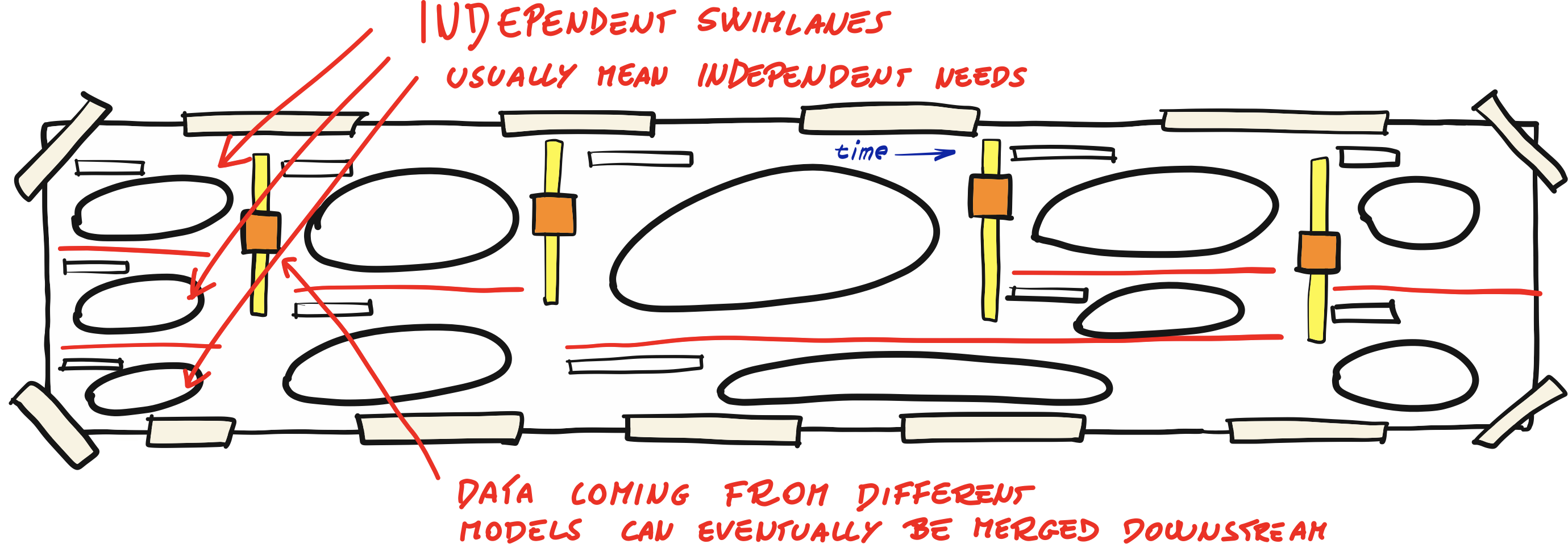
- In a draw.io diagram, the yellow bar spans the gap between two bounded context ellipses
Identification Heuristics (Michael Plöd)
- Events that trigger significant downstream activity (the "So what?" test)
- Events representing key business decisions or policy enforcement
- Events involving hand-overs to external parties (boundary crossings)
- Events leading to lasting state changes
- Events indicating bottlenecks or failure points
- Events with compliance/regulatory significance
- Events impacting multiple stakeholders
- Events with high business value realization potential
- "A Pivotal Event probably sits on the boundary of a subdomain" — Plöd
Speed beats precision
- Initial pivotal events are provisional — expect them to change as the model emerges
- Detection prioritizes plausibility and balanced distribution over perfection
- Whatever notation is used should be easily reversible
- Don't expect to finish the workshop with the same pivotal events you started with
Examples
- "Contract Signed" — before: negotiation phase; after: execution phase
- "Payment Received" — before: ordering; after: fulfillment
- "Product Added to Catalog" — before: back-office management; after: front-office discovery
Layout Rules
Single Row Per Subdomain
- All events in a bounded context appear in a single horizontal line
- NO grids or matrices (no 3x3, 4x2 arrangements)
- Only exception: truly parallel event flows within a domain may use a second row
- Even then, prefer putting one flow logically after another in a single line
Timeline Flow
- Events flow left to right chronologically (paper roll represents time)
- Within a bounded context, group events by phase with small gaps
- Parallel streams go top to bottom on the paper roll
Vertical Stacking for Dependencies
- If subdomain A publishes events consumed by subdomain B, place B directly below A
- Spatial proximity communicates the relationship — no async arrows needed
- Stacking full-width lanes implies true parallelism; only stack below the trigger subdomain
- Center dependent subdomains below their trigger, not below the entire row
Visual Layout
Pivotal events sit between boundaries — they are the seam, not inside either context.
    ┌── ── CONTEXT A ── ──┐            ┌── ── CONTEXT B ── ──┐
    │ [evt] [evt] [evt]   │ [PIVOTAL]  │ [evt] [evt] [evt]   │
    └── ── ── ── ── ── ──┘    |||      └── ── ── ── ── ── ──┘
                               |||
               │ events (async)│
               ▼               │
    ┌── CONTEXT C ── ──┐       │       ┌── CONTEXT D ── ── ──┐
    │ [evt] [evt]      │ [PIVOTAL]     │ [evt] [evt] [evt]   │
    └── ── ── ── ── ──┘               └── ── ── ── ── ── ──┘
Pivotal Events with Multiple Subscribers (Split Layout)
A pivotal event that triggers reactions via policies may have multiple subscribing subdomains (n). The layout generalizes into two cases:
Even number of subscribers (n = 2, 4, 6...):
- Draw a red hand-drawn line at the pivotal event level
- Stack n/2 subscribing subdomains above the red line
- Stack n/2 subscribing subdomains below the red line
- Primary/main flow subscribers go above; secondary below
Odd number of subscribers (n = 1, 3, 5...):
- Place 1 subscribing subdomain at the same level as the pivotal (continues the main line)
- If n > 1: draw red lines above and below the center subdomain
- Stack (n-1)/2 subscribers above the upper red line
- Stack (n-1)/2 subscribers below the lower red line
- When n = 1, no red line needed — simple sequential continuation
EVEN (4):        ODD (3):         ODD (1):
  [A]              [A]
  [B]            ═ red ═
═ red ═            [B] ← center    [A] ← same lane
  [C]            ═ red ═
  [D]              [C]
This visually communicates the fan-out — the pivotal causes reactions in all subscribing subdomains. When stacking multiple subscribers above or below a single red line, space them vertically with enough clearance for their ellipses.
Red Separator Lines
Red hand-drawn lines are local visual separators at pivotal split points.
- Draw at the pivotal event level, separating above from below subscribers
- Extend across the subscribing subdomain area (not full canvas width)
- For even splits: 1 red line. For odd splits (n ≥ 3): 2 red lines (above and below center)
- Do NOT use arrows or connectors — the layout communicates causality
- Reference: Brandolini's Big Picture layout
Bounded Context Boundaries
- Draw hand-drawn ellipses (not rectangles) around event clusters
- Dashed/striped borders work well
- Boundaries are emergent — they come FROM the pivotal events, not imposed beforehand
- Swimlane dividers (red lines) between non-sequential clusters improve readability
Naming Conventions
- Domain Events: past tense verbs — "Order Placed", "Payment Received", "Product Added to Catalog"
- Actors: role or department — "Customer", "Warehouse Team", "Partner System"
- Systems: specific names — "Inventory Service", "Payment Gateway", "Excel Spreadsheet"
- Hotspots: questions or concerns — "Who maintains compatibility rules?", "Real-time vs cached?"
Source
Based on EventStorming Glossary & Cheat Sheet by DDD-Crew (Kenny Baas-Schwegler, Chris Richardson) and Alberto Brandolini's EventStorming methodology.